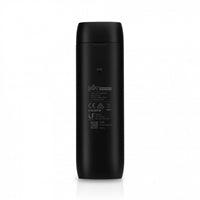
UniFi Protect ViewPort
The UniFi Protect ViewPort lets you easily display your UniFi Protect camera feeds on any HDMI display. Designed for seamless integration with your existing UniFi Protect system, it connects to your local network via Power over Ethernet (PoE) and outputs high-quality video over HDMI.
Key Features
-
View UniFi Protect Cameras on HDMI
Connect the ViewPort to an HDMI display to monitor your UniFi Protect camera feeds. -
High-Density Camera Matrix
Display custom high-density camera matrix configurations, with support for viewing up to 16 IP cameras simultaneously. -
Simple UniFi Protect Integration
Easy setup with your UniFi Protect system and local network hosting your cameras. -
Power over Ethernet Connectivity
Powered by PoE with network speeds up to 1 Gbps for streamlined installation. -
4K HDMI Output
HDMI video output up to 4K resolution at 30 frames per second.
Specifications
| Specification | Detail |
|---|---|
| Video Output | HDMI up to 4K @ 30 fps |
| Maximum Simultaneous Cameras | Up to 16 IP cameras |
| Power/Input | Power over Ethernet (PoE) |
| Network Speed | Up to 1 Gbps |
| System Compatibility | UniFi Protect system |