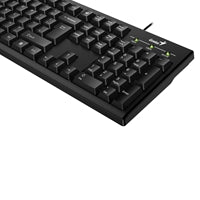
Genius Smart Keyboard – Type Smart. Live Smart.
The Genius Smart Keyboard is designed for the smart generation, delivering powerful customization and efficiency at your fingertips. With fully programmable function keys and intuitive visual controls, it lets you work and play the way you want.
Customize to Your Needs
Increase your efficiency by 20–30% or more with highly flexible function key customization.
- Customize any of the 12 function keys (F1–F12)
- Launch applications
- Visit websites
- Enable multimedia functions
- Send emojis
- Create app-internal shortcuts
- Insert frequently used words or phrases with a single keypress
Convenience and efficiency are just one keystroke away.
Visualize Your Settings with Genius Key
See exactly how your keyboard is configured with the Genius Key visual function bar.
- View your current function key mappings at a glance
- Watch mappings change dynamically when you switch between applications
- Get reminders of your settings so you never forget what you assigned
See what you set, and watch smart in motion.
Controls for Maximum Efficiency
Take full control of the 12 function keys with prebuilt access methods:
- Launch applications
- Access documents
- Open your browser to specific URLs
- Insert common emoji characters
- Send standard key codes
For finer control, you can:
- Specify applications or web URLs with parameters
- Define free-style keystrokes, as if you are typing them, triggered by a single function key
Create Your Own Media Player Keyboard
Turn the Genius Smart Keyboard into your personalized media control center.
- Assign multimedia functions to any function key
- Arrange multimedia keys in any positions you prefer
- Designate keys for instant access to your idol singer, top-hit list, or frequently played tracks
- Enjoy quick control with your favorite desktop music players such as Spotify, KKBox or similar services
More Fun with Social & Apps
Make your keyboard truly yours:
- Imagine a dedicated emoji keyboard
- Create your own app-specific keyboard layouts
- Download prebuilt sample profiles for inspiration
It’s time to show off your Smart Keyboard to friends.
Watch Smart in Motion
After you personalize your frequently used applications:
- Visualize smart behavior with personalized function key “APPs”
- The Smart Engine automatically maps function key settings per application
- When you switch applications, your function keys adapt instantly
Smart Quiz: With application-based profiles, how many function keys does this keyboard effectively provide?
Genius Smart Keyboards & Smart Engine
The Genius Smart Keyboard, combined with the Genius Smart Engine, offers:
- Complete control of the 12 function keys
- Unique setups tailored to your favorite web services, apps, social platforms, or business tools
Specifications
| Feature | Detail |
|---|---|
| System Requirements | Windows 7, 8, 8.1, 10 or later; Mac OS X 10.8 or later |
| Interface | USB port |
| Keycap Type | Concave |
| Cable Length | 1.5 m |
| Genius Key Support | Yes |
| Customizable Function Keys | F1 to F12 |
| Smart Engine | Yes (SmartGenius) |
| Visual Function Key Bar (Virtual) | Yes |
| Function Key | Yes |
| App Profile Support | Yes |
| SmartGenius Support | Yes |
| SmartGenius App Download | www.geniusnet.com/download |
| Colours | Black |
| Dimensions (W x H x D) | 440.51 x 139.67 x 20.07 mm |
| Weight | Approx. 450 g |
Remark: The product hardware and firmware are factory preset. You can adjust the settings to meet your needs. For firmware updates, please check the website.