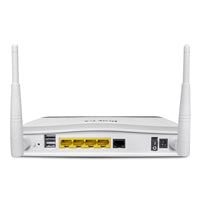
DrayTek Vigor 2763 VDSL & Ethernet WAN Gigabit Router
The DrayTek Vigor 2763 is a VDSL or Ethernet WAN router delivering Gigabit performance, enabling you to take full advantage of DrayTek’s advanced feature set, including Quality of Service (QoS), VPN and Content Filtering.
Connect the Vigor 2763 directly to Superfast Fibre via its integrated VDSL modem, or use Ethernet WAN for Virgin Media Cable and Ultrafast FTTP services. Either WAN connection, or a 4G USB modem, can operate as the primary or failover link. If the main Internet connection goes down, the Vigor 2763 can automatically switch to backup connections for reliable Internet access and VPN connectivity.
Powerful SoHo VPN Router
Designed for small office and home office environments, the Vigor 2763 offers extensive VPN (Virtual Private Networking) capabilities:
- Up to 200 Mbps IPsec VPN throughput
- Up to 2 concurrent VPN tunnels
- Ideal for connecting branch offices and home offices back to head office
- Enables secure remote desktop, file sharing and access to network resources
Supported VPN protocols and features include:
- IPsec IKEv1 & IKEv2 with EAP and XAuth authentication
- DrayTek SSL VPN
- L2TP for LAN-to-LAN and Dial-In teleworker VPNs
- OpenVPN for teleworkers
- User management for Dial-In Teleworkers via the router’s web interface
- mOTP 2-factor authentication for IPsec, L2TP and SSL VPN Teleworker connections
Connecting Remote Sites with LAN-to-LAN VPN
With support for up to 2 concurrently active VPN tunnels and 200 Mbps of IPsec VPN throughput, the Vigor 2763 is well suited as a branch-office or home-office router, linking back to a head office router such as the Vigor 3910.
Once connected, remote sites gain secure, encrypted access to office resources, enabling:
- Remote desktop
- File sharing
- Seamless access to devices and services on the main network
DrayTek SSL VPN for Teleworkers & LAN-to-LAN
The Vigor 2763 supports up to 2 DrayTek SSL VPN tunnels, using SSL/TLS encryption similar to HTTPS used by online banking and shopping services.
- Securely links teleworkers or remote DrayTek Vigor routers back to your main office
- Teleworkers can connect using the free DrayTek Smart VPN Client app
- Available for Windows, macOS, Apple iOS (iPad, iPhone) and Android
VPN Connectivity Behind NAT with DrayTek VPN Matcher
Connecting VPN tunnels normally requires the VPN server to be directly reachable on the public Internet. This can be difficult when:
- The router is behind another router and using NAT
- The connection uses 4G Mobile Broadband
- The connection is behind Carrier-Grade NAT (CG-NAT)
DrayTek’s VPN Matcher service helps Vigor routers behind NAT:
- Allow Dial-In Teleworkers to connect
- Establish VPN tunnels between two DrayTek routers that could not usually connect due to NAT restrictions
AC1300 Dual-Band Wireless LAN with Mesh (Vigor 2763ac)
The Vigor 2763ac model provides:
- Wi-Fi 5 (802.11ac) simultaneous Dual-Band wireless
- AC1300 wireless performance
- Multi-User MIMO for more efficient wireless throughput to multiple devices
- Improved performance over standard 802.11ac wireless
- Better service for multiple wireless clients simultaneously
The Vigor 2763ac can operate as part of DrayTek’s Mesh wireless system:
- Works as the Mesh Root
- Provides Internet access for Mesh VigorAPs
- Centrally manages connected Mesh VigorAPs
4 Gigabit LAN Ports with VLANs
The Vigor 2763 series includes 4 Gigabit LAN ports for wired connections to:
- Computers
- Servers
- Network Attached Storage (NAS)
With 2 LAN subnets and VLAN support, you can:
- Create a fully separate guest network from your internal network
- Run 2 wireless networks with different IP ranges
- Separate printers and servers onto their own subnet
Each network can have its own:
- Content Filtering
- Firewall policies
- Quality of Service rules
- Route Policy configurations
Designed for Central Management
The Vigor 2763 series is built for centralised management via the VigorACS management platform, alongside VigorAPs and switches.
VigorACS provides:
- Central visibility and control of your DrayTek estate
- Scalable management for dealers, system integrators and multi-site users
- Reporting and monitoring of device status
- Automated and bulk firmware updates
- VPN management
- Alerts for connectivity and other issues
Robust IPv4 / IPv6 Firewall Security
Security is a priority with the Vigor 2763’s comprehensive firewall:
- Protection against DoS (Denial of Service) and IP-based attacks
- Safeguards for Wireless, Ethernet and VPN traffic
- Object-based firewall rules for flexible security policies
You can apply Content Filtering and firewall rules to:
- The entire network
- Specific devices
- Guest networks only
Additional firewall capabilities:
- Dual-Stack IPv4/IPv6 support
- Advanced features (Firewall, QoS, Content Filtering, VLANs) for both IPv4 and IPv6 networks
Web Content Filtering with DNS Filter
The Vigor 2763’s content control features allow you to:
- Restrict access to specific websites using whitelists and blacklists
- Block download of certain file or data types
- Block IM/P2P applications and other unwanted content
- Apply restrictions per user, per PC, or network-wide
- Use time schedules for different access policies
Content filtering can also block sites accessed over HTTPS/SSL, where URLs are encrypted.
Using the GlobalView service (annual subscription):
- Block whole categories of sites (e.g. gambling, adult content, malware-infected sites)
- Benefit from continuously updated categorisations
A free 30-day GlobalView trial is included with your new router.
DrayDDNS – Free Dynamic DNS from DrayTek
Each Vigor 2763 router includes a free DrayTek Dynamic DNS (DrayDDNS) hostname, for example:
vigor2763.drayddns.com
Key benefits:
- Maps the router’s current IP address to a memorable hostname
- Automatically updates when the WAN IP changes or when failing over between WANs
- Simplifies access to:
- VPN services
- Router management
- Any services exposed through the router
The Vigor 2763 can also:
- Authenticate your DrayDDNS hostname with free SSL/TLS certificates from Let’s Encrypt
- Automatically manage and renew certificates
- Use certificates with SSL VPN and other secure services
Quality of Service with App QoS
App QoS on the Vigor 2763 makes Quality of Service simple:
- Prioritise key applications and services, such as Zoom and Skype
- Use 4 separate queues to prioritise by:
- Device (IP address)
- Services (e.g. VoIP, DNS)
- Packet tagging (802.1p and DSCP) used by IP phones
Additional traffic management features:
- Auto Voice VLAN to automatically prioritise VoIP calls
- Bandwidth Limit to control throughput by:
- Individual client
- Groups of IPs
- Entire subnets, such as a Guest network
Key Technical Highlights
| Feature Category | Details |
|---|---|
| WAN Connectivity | VDSL modem, Ethernet WAN, 4G USB modem (primary or failover) |
| LAN Ports | 4 x Gigabit Ethernet |
| VPN Throughput | Up to 200 Mbps IPsec VPN |
| Concurrent VPN Tunnels | Up to 2 |
| VPN Protocols | IPsec IKEv1/IKEv2 (EAP, XAuth), SSL VPN, L2TP, OpenVPN |
| Wireless (2763ac) | AC1300, Wi-Fi 5 (802.11ac), Dual-Band, MU-MIMO, Mesh Root support |
| Subnets & VLANs | 2 LAN subnets with VLAN support |
| Management | VigorACS central management, DrayDDNS, Let’s Encrypt certificates |
| Security | IPv4/IPv6 firewall, DoS/IP attack protection, object-based rules |
| Content Filtering | DNS Filter, GlobalView categories, HTTPS/SSL site blocking, scheduling |
| QoS | App QoS, 4 QoS queues, Auto Voice VLAN, Bandwidth Limit |